


[Updated January 2024] This blog post idea comes from a reader’s question… “Is there any way to get a size of our PHLs in each site collection?”
Short answer? Yes.
Background… there are 5 Purview features that will cause something to be copied into a special library on a SharePoint site called the Preservation Hold Library (PHL). The PHL is hidden from the Site Contents view on a SharePoint site; however, if you are a site collection administrator (includes site owners), you can navigate directly to it with this URL: ~/sites/<sitename>/preservationholdlibrary.
The 5 Purview features that store content in the PHL are shown in this graphic and explained below:

- When a retention policy is published to the site and configured to “Retain for X”, all document changes and deletions are preserved as document copies in the PHL for the period of X
- When a record retention label is applied to an item, it is unlocked to make a change and then subsequently relocked, a copy of the document BEFORE the change is put in the PHL for the duration of the retention period defined on the retention label (period depends on label configuration)
- If the tenant level setting allowing users to delete labeled items is enabled on OneDrive and SharePoint, the “deleted” document will be copied into the PHL for the remaining retention period defined on the retention label
- If a retention label auto-apply policy has been configured for the site with the “Apply label to cloud attachments and links shared in Exchange, Teams, Viva Engage and Copilot” condition, a copy of the file that was shared as a modern attachment is placed in the PHL for the duration of the retention period of the retention label
- If an eDiscovery hold is placed on a user’s OneDrive or a SharePoint site (collection), all changes and deletions are copied as complete documents into the PHL for the duration of the hold
Takeaway… there is potentially a lot of content being preserved in the PHL depending on the Purview features you have in place in your tenant.
Warning about subsites and retention controls: if you have subsites in your tenant and the subsite is part of a site (collection) that has a retention policy published to it, there will be a PHL created on each subsite as well (automatically created the first time something needs to be stored in the PHL on the subsite). This means the combined space of all subsites including their PHLs will contribute to the overall site collection’s storage quota. Although there are other reasons to stay away from subsites, retention storage is another very good reason to stay away from them wherever possible.
If you consider the scenario where retention durations are for a long period of time, the PHL could get very large, particularly if the site is active.
A few key things to know about the PHL when it comes to storage management:
- There’s no central location where you can collectively see the space consumed by all sites’ PHLs for a retention policy.
- The space the PHL consumes is included in the SharePoint site’s overall storage quota and in fact, is no different than a regular document library in that respect.
- You cannot remove content from the PHL. This is by design as the intent of the library is to retain content.
- To see how much space the PHL is consuming via the UI, browse to the SharePoint Online site where the retention policy is published, click the gear icon in the top right… Site information… View all site settings… under the grouping “Site Collection Administration” select Storage Metrics (image).
- If you have subsites in the site collection, their storage metrics will be separated out by subsite (SubSite A starred in image). The PHL showing at the site collection level does not include all of the PHLs that may also exist across its subsites.

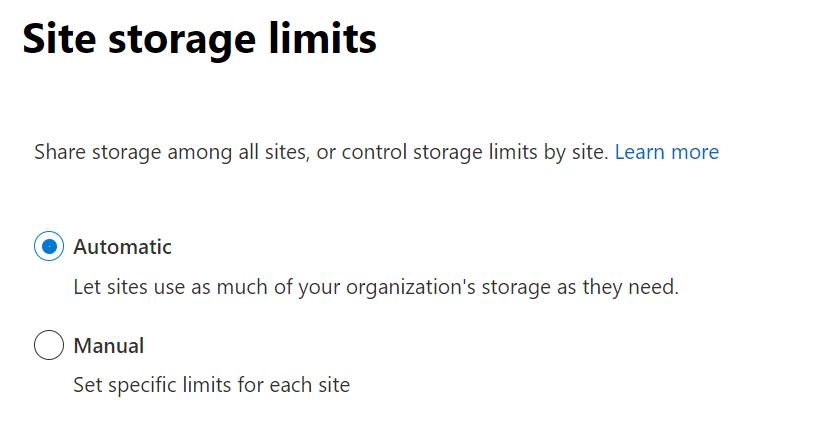
- By default, each site has a maximum storage allocation of 25TB and is managed from a central pool of storage; however, you can change this behavior via the site storage limits settings from the SharePoint Admin Center:

- You can either automatically expand the storage limits of sites (default) or manually set limits per site.
- If you choose to manually specify limits, you can set the limit as well as the percentage threshold for notification.
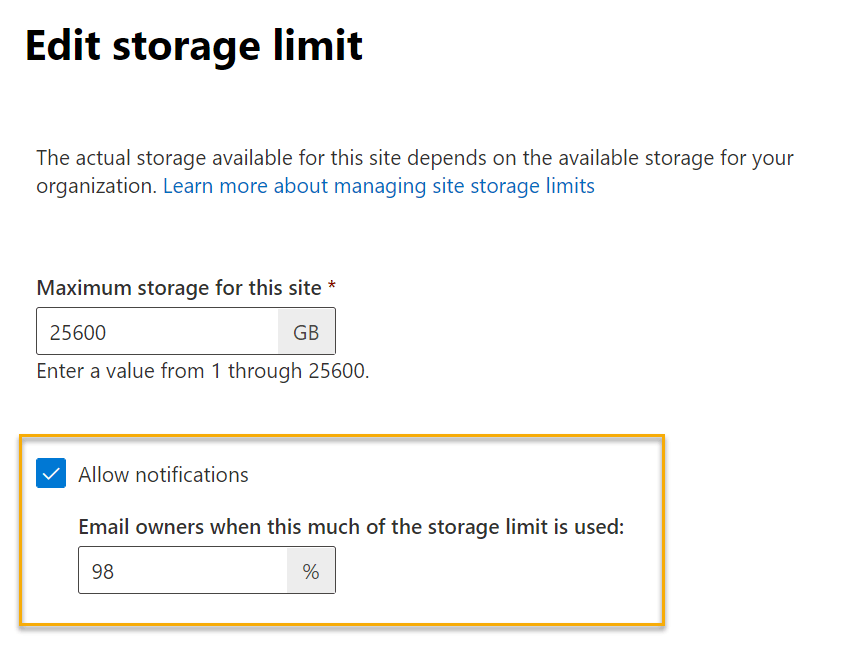
- If the threshold percentage is reached, a yellow notification bar will show on the site stating “Running out of space. This site is almost out of storage space. To free up space, delete files you don’t need and empty the recycle bin.”
- To free up space, files can be deleted out of the recycle bin; however, they must be removed from both the first and second stage recycle bins before space will be freed up.
- This warning will typically cause alarm for end-users and quickly results in a call to the service desk… as an administrator, you can increase the site’s storage quota to immediately allocate more space and remove the warning. If no action is taken, the site will turn read-only when the limit is reached. Although administrators will receive an email warning of the storage threshold, this is only a weekly notification which may not be sufficient in your environment.
- To be more proactive, monitor site limits (daily?) via PowerShell (Monitor SharePoint storage limits via PowerShell and send admin notifications before you hit the limit.
- If you’ve reached the maximum storage allocation for your tenant, you can request more. Reference: Add storage space for your subscription.
Note: a similar situation can happen in a user’s OneDrive site as it uses the same PHL mechanism to retain content. For most subscription plans, the default storage space for each user’s OneDrive is 1TB; however, depending on the number of licensed users and your plan, this can be increased up to 5TB. Refer to this link for increasing the limit for user(s): Set the default storage space for OneDrive users.
Closing thoughts
Storage management is an important task for SharePoint Administrators and should be part of your overall information governance program, particularly if you have long-running retention policies adding items to PHLs in sites across your tenant. Make sure you’re considering this aspect of your governance program when publishing retention policies.
It’s the cost of compliance.
Thanks for reading.
-JCK