

[Updated July 2026] My infographic linked to below has been refreshed thanks to Copilot. It contains a contrast and comparison of 20 key behaviors between sensitivity labels and retention labels.
In Microsoft Purview, whether you’ve implemented sensitivity labels before retention labels (most common from my experience) or the other way around, it’s helpful to understand some key similarities and differences between their behaviours and not assume they’re the same. This knowledge can help inform your enablement strategy across users and locations in your organization.
This post is focusing on the practical side of these 2 types of labels and how different they really are.
To communicate these behavior differences, I’ve asked Copilot to help create an infographic based on a table I provided of 20 key behaviors I commonly see misunderstandings around. There are some nuanced details on each one that the infographic doesn’t go into; however, knowing what’s different is the first step.
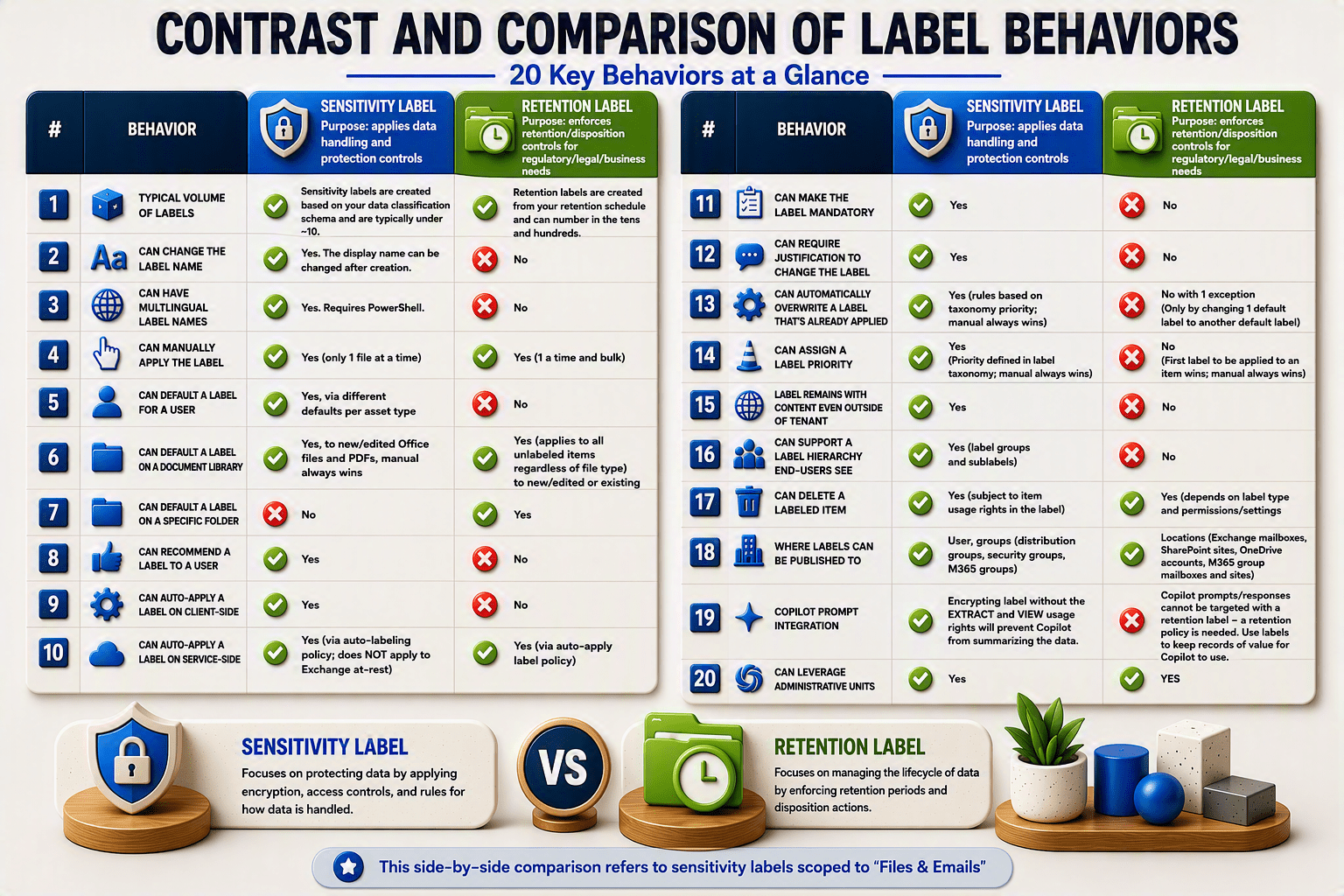
Link to PDF: INFOGRAPHIC – Contrast and Comparison
In no particular order, here are the 20 behaviours listed in the infographic:
- Typical volume of labels
- Can change the label name
- Can have multilingual label names
- Can manually apply the label
- Can default a label for a user
- Can default a label on a document library
- Can default a label on a specific folder
- Can recommend a label to a user
- Can auto-apply a label on client-side
- Can auto-apply a label on service-side
- Can make the label mandatory
- Can require justification to change the label
- Can automatically overwrite a label that’s already applied
- Can assign a label priority
- Label remains with content even outside of tenant
- Can support a label hierarchy end-users see
- Can delete a labeled item
- Where labels can be published to
- Copilot integration
- Can leverage administrative units
I hope you found this helpful to get a birds-eye view of the differences between them.
Thanks for reading.
-JCK
This is AWESOME!!!!! I have never found a clearer explanation of “labels” from Microsoft or anyone else.
Thank you! I appreciate that feedback!!
Hey Joanne, I try the link but not able to access.
Hi Justin,
What link isn’t working? The link to the post or the link to the infographic? I checked the infographic link again and it is working. Try this: https://joannecklein.com/sensitivityversusretentionlabels and let me know if you’re still having issues access it. Thanks!!