

After working with many customers mapping their retention schedule into a workable Purview File Plan, I’ve observed a set of similar challenges.
Did you know? AI hasn’t changed or eliminated the underlying challenges – it has simply made them more urgent. Perhaps, retention and deletion controls matter now more than ever.
I call these challenges “Hot Spots” and I’ve previously listed all of them in a blogpost titled Retention Schedule “Hot Spots” for Microsoft Purview.
This post is a detailed explanation of Hot Spot 3… the number of record series requiring a disposition review at the end of the retention period. This hot spot has made the third position in the list due to the human resource impact and technical limitations.
TL;DR:
Simply put, the fewer retention labels requiring a disposition review in your file plan implementation the simpler and more manageable your “operational load” will be. Trust me.
There are many hills I will die on, this is one of them.
Don’t feel like reading the whole post to get to my recommendations? Here you go… 💡 Practical steps to help
I can’t begin to tell you the number of times I see most/all record series in a retention schedule requiring review prior to deletion. I understand this can be a regulatory requirement and I’m not here to argue with the regulators. What I can say is that in practical terms, this is extremely difficult to follow thru with at scale.
What is a disposition review? A disposition review requires one or more people to assess a record at the end of its retention period and determine its next step: delete it, retain it longer, or transfer it elsewhere. Whatever decision is made must be auditable, defensible, and aligned to legal, regulatory, and business requirements.
In theory, this sounds straightforward. In practice, it is anything but. Many retention schedules were created in a paper-based era when records volumes were much more manageable. Today’s digital workplace generates exponentially more content, turning what was once a periodic review activity into a significant operational challenge. As content volumes grow, so does the effort required to review, justify, and document disposition decisions at scale.
Based on my experience in the records management space, here are the key challenges I see when too much content requires disposition review in Microsoft Purview and some practical steps to help:
😲 Challenge 1: Reviewer fatigue
📁 Challenge 2: Case/folder-level review and disposal
🪪 Challenge 3: Reviewer permission requirements
🛑 Challenge 4: Tenant limits
📃 Challenge 5: Certificate of destruction
😲 Reviewer fatigue
Disposition review is a significant responsibility and, if not managed carefully, can lead to reviewer fatigue. In many organizations, reviewers may need to assess hundreds or thousands of items, often requiring different subject matter experts depending on the content type and regulatory requirements. Whether it’s business units, legal, records management, IT, or executive leadership, reviewers are usually taking on work beyond their day-to-day responsibilities.
Organizations that see the greatest success recognize this upfront and make compliance activities, including disposition review, an explicit part of job expectations and responsibilities.
📁 Case/folder-level review and disposal
Records rarely exist in isolation. More often, they are part of a case: a collection of related records that together document a business activity or decision. In SharePoint, these cases are commonly represented through folders or document sets, allowing related content to be organized and managed together.
The challenge is that Purview disposition reviews do not follow these same case-based structures. Reviews occur at the individual item level, meaning reviewers cannot review and make disposition decisions for all records within a case, folder, or document set as a single unit.
While Purview allows reviewers to dispose of approved items in bulk, the review process itself remains item-based. In other words, bulk disposition can reduce the effort required to execute a decision, but it does not eliminate the need to first review records individually and determine whether they should be deleted, retained longer, or otherwise dispositioned.
Reviewers can also use URL filtering to identify items within a specific folder or document set, but this is not a purpose-built case review experience. In practice, reviewers must still work through individual records, increasing the time and effort required to complete reviews.
This limitation can significantly amplify the challenge of reviewer fatigue. Instead of evaluating a case as a whole, reviewers may need to assess dozens or even hundreds of related records one at a time, creating additional administrative overhead and slowing the disposition process.
As of August 2026, there is no native case-based disposition review capability in Microsoft Purview. The primary workaround is to filter pending disposition items by URL to target content within a specific folder or document set, but the review experience remains item-based.
🪪 Reviewer permission requirements
Assigning a user as a disposition reviewer, either directly or through a group, does not automatically grant them access to the Pending Items review experience in Microsoft Purview. Reviewers must also be assigned the appropriate Purview permissions and roles.
This can create a frustrating experience for new reviewers. Purview will still send the automated disposition review notification email, but if the required roles have not been assigned, the reviewer will encounter a permissions error when attempting to access the review page.
While this may seem like a one-time configuration task, it quickly becomes an ongoing operational consideration. As reviewers join, leave, change roles, or as retention label reviewer assignments evolve, the corresponding Purview permissions must also be maintained. Security and compliance administrators need to be aware of this dependency and incorporate it into their records management processes.
Without a defined onboarding and offboarding process for reviewers, organizations can experience delays in completing disposition reviews, creating additional administrative effort and contributing to review backlogs.
For more details on the required permissions and role assignments, see my blog post: Microsoft Purview Disposition Review and Permissions
🛑 Tenant limits
When designing a retention schedule that includes disposition review, it is important to understand the current Microsoft Purview limits. These limits can become a practical challenge, particularly in large or highly regulated organizations where many retention labels require review before disposition.
One of the most commonly overlooked limits is the maximum of 200 disposition reviewers per tenant, including both individual users and mail-enabled security groups. While 200 may sound like a large number, organizations with complex retention schedules, decentralized business units, or regulatory requirements that call for specialized reviewers can reach this limit more quickly than expected.
I’ve worked with customers who discovered this constraint after designing their retention schedule and were forced to revisit their file plan, reducing the number of labels configured for disposition review or consolidating reviewer assignments to stay within the supported limits.
For this reason, reviewer limits should be considered early in the planning process rather than after disposition reviews have been implemented. Understanding these constraints upfront can help avoid rework and ensure your retention and disposition strategy remains scalable over time.
For the latest limits, see Microsoft’s documentation on Microsoft Purview retention limits
📃 Certificate of destruction
When a disposition decision is made, Microsoft Purview records details about that action in the Microsoft 365 Unified Audit Log. This audit trail can provide important evidence for records managers and auditors, including:
- Approval comments
- Decision date
- Extended retention date (if applicable)
- Original and new label values (if the item was relabelled)
- Item location (URL)
- Unique item identifier
- Disposition stage name
- Reviewer identity
Purview also allows organizations to export a list of disposed items right from the Disposed Items list as a form of proof of destruction. However, many records managers find that the export alone does not capture enough information to satisfy audit, compliance, or regulatory requirements. As of August, 2025, the export includes:
- Item location (URL)
- Title or subject
- Retention label name
- Approval comment
- Reviewer identity
- Deletion date
As a result, organizations often need to supplement the exported data with information from the Unified Audit Log to create a more complete and defensible disposition record. This additional effort can introduce operational overhead, particularly for organizations with stringent compliance, legal, or records management requirements.
💡 What are some practical steps you can take to help with these challenges?
I wouldn’t be a very good consultant if I only highlighted the challenges without offering some practical ways to address them. While there’s no silver bullet, these approaches have helped my customers’ organizations make disposition review more manageable and sustainable.
Be Selective About What Requires Review
If you take away only one recommendation, make it this one: minimize the number of retention labels that require disposition review in the first place.
Reserve disposition reviews for content that is truly high-value, high-risk, or subject to specific regulatory requirements. The more content routed through a review process, the greater the administrative burden, reviewer fatigue, and risk of backlog.
For content that can be automatically deleted at the end of its retention period, make sure the decision is:
- Well documented and approved
- Thoroughly tested before rollout
- Reflected in organizational policies and procedures
- Reviewed periodically to confirm it remains appropriate
The goal is not to avoid governance. It’s to apply disposition review where it adds genuine value rather than making it the default for every record.
Establish Designated Record Owners
Rather than assigning reviewers broadly across the business, consider establishing a small number of designated record owners for key functional areas such as Finance, Human Resources, Engineering, or Legal.
This approach creates accountability and provides several operational benefits:
- Targeted training for a smaller reviewer community
- More consistent disposition decisions
- Fewer permission assignments and changes over time
- Lower risk of reaching the tenant limit for disposition reviewers
- Simplified reviewer onboarding and offboarding
Most importantly, it helps make records management an intentional business responsibility rather than an occasional task assigned to whoever happens to own the content.
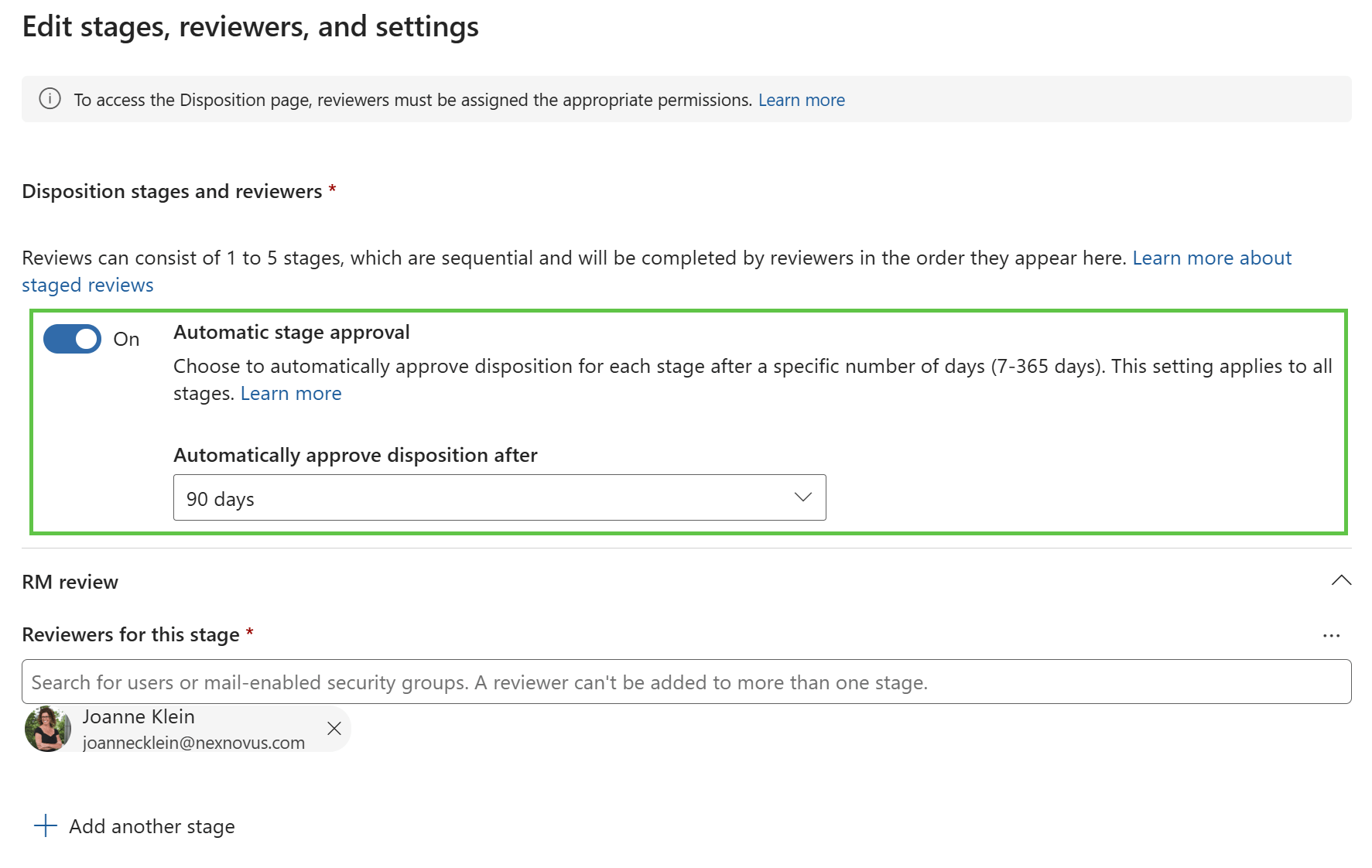
Use Automatic Stage Approval Strategically
Microsoft Purview includes an Automatic Stage Approval option that can move content to the next review stage, or complete the disposition process, after a specified period if no action is taken.
When used appropriately, this feature can help prevent pending review queues from growing indefinitely and can significantly reduce reviewer fatigue.
That said, automatic approvals should not become a substitute for effective records management. I recommend monitoring how frequently items are being automatically approved and reviewing the trend over time. If a significant percentage of content is consistently reaching automatic approval, it may indicate that:
- Too much content requires review
- Reviewers are overloaded
- The retention schedule needs refinement
- Certain categories of content may be better suited to automatic disposition
The activity is audited, allowing organizations to measure how often this occurs and adjust their approach accordingly.
Closing thoughts
Disposition review works best when it is focused, intentional, and scalable. Limit reviews to the content that truly warrants human judgment, establish clear record ownership, and use automation to prevent bottlenecks. These steps can significantly reduce reviewer fatigue while still maintaining a defensible and compliant disposition process.
Thanks for reading.
-JCK
Great read Joanne, one point worth adding that came to mind when I was reading the paragraph on certificate of destruction for readers is that a certificate of destruction doesn’t necessarily need to exist for every individual record. In traditional records management practice, evidence of destruction can be maintained at an aggregate or batch level, provided there is sufficient evidence to identify what was destroyed, under what authority, when and with whose approval.
For example, a single disposal certificate could document the disposal event for a batch of records, supported by a manifest identifying the individual records covered by that event. The certificate might record the authority, approval, disposal date and method, while the manifest provides the record identifiers, titles, classifications or other information needed to establish exactly what was included.
That distinction may be useful when considering Purview. Rather than asking whether Purview can generate a conventional destruction certificate for every disposed item, perhaps the better question is whether its Disposed Items data and audit evidence can be used to create a defensible record of a disposal event or cohort, with the affected items identified as part of that evidence.
It seems a small distinction, but it can materially change how we assess whether a modern records management platform meets the underlying evidentiary requirement rather than reproducing a feature of traditional EDRMS products.
Thank you for your valuable insight AJ! I appreciate your clarification on the aggregate certificate. This does tie back to the second challenge about Purview not recognizing records in aggregate (case/folder).